Take / SSD Take / SLOW File
The Take, SSD Take, and SLOW File panes are used to provide basic details for the playback source.
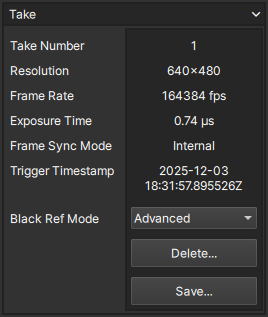
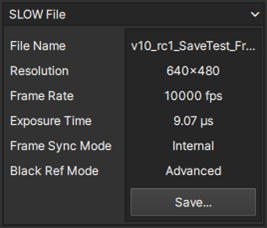
Identifier
Each playback object has a context-aware identifier whose label will reflect the content.
| Playback Object | Identifier | Definition |
|---|---|---|
| Take | Take Number | Take # based on the partition it is in |
| SSD Take | Name | Name of the take stored on the SSD |
| SLOW File | File Name | Name of the SLOW file stored on disk |
Resolution
The Resolution of the current playback object displayed as pixel width x height.
Frame Rate
The Frame Rate of the current playback object displayed in units of fps (frames per second)
Exposure Time
The Exposure Time of the current playback object displayed in units of µs (microseconds)
Frame Sync Mode
The Frame Sync Mode of the current playback object.
Trigger Timestamp
Displays the timestamp recorded at the moment the playback object was triggered.
Because the Trigger Timestamp indicates the time the trigger signal was received, it may differ slightly (within one frame period) from the timestamp of the trigger frame (frame 0).
Black Reference Mode
The Black Reference Mode of the current playback object.
In the case of a Take in the camera, the black reference mode will appear as a control that can still be toggled between Normal & Advanced.
After a Take is saved to the SSD or a SLOW file, the black reference mode cannot be changed.
Buttons
Each pane also contains context-aware buttons relevant to the content.
Delete
Accessible only for Takes in the camera's frame buffer, this allows users to clear the file from the memory.
Save
Accessible for all objects, this button allows users to save the Take, SSD take, or re-save a SLOW file.